
How to turn fanfic into an audiobook with AI (step by step)
Turn a fanfic from AO3, FanFiction.net or Wattpad into an AI audiobook with a different voice for every character: download, clean up, cast, add emotion, export M4B.
Short answer: to turn a fanfic into an audiobook, download the fic as an EPUB (on AO3, press Download → EPUB), upload it to Warblize, which removes AO3's tags and notes pages for you, press Find characters so every character gets their own AI voice, and export one M4B audiobook with a chapter marker for each chapter. A 50,000-word fic takes about 30 minutes of your time and comes out at about 5.5 hours of audio. Only narrate a fic you wrote, or one whose author has said yes, and never sell it.
Key facts
- Files: EPUB, PDF, DOCX or TXT, up to 100 MB (a PDF fic converts too). AO3's EPUB download works best: its Preface, Afterword and Chapter Notes are removed automatically.
- Voices: a full cast, with a different AI voice for every character, chosen automatically and changeable by hand.
- Emotion: type [ in any line to add a tag such as [sigh], [laugh] or [whispers].
- Length: about 9,000 words per hour of audio.
- Cost: one credit per 60 minutes of finished audio. Casting, editing, previews and exports are free.
- Output: M4B (one audiobook file with chapters and cover), MP3 or WAV.
- Rules: your own fic, or the author's permission. Keep it non-commercial and label it as AI-narrated if you share it.
Listen to a sample first
This is what you get: the opening scene of The Rival's Oath, a short sample fic written for this guide, made in Warblize with four AI voices: a narrator, Kit, Rowan and Professor Vale. Kit's "Someone has to be" uses a [sigh] tag. The audio is not edited.
Read the scene (transcript)
The library was empty except for Kit, one lamp, and a map she had no business reading.
Kit: "You're late," Kit said, not looking up from the map.
Rowan leaned against the doorframe and grinned.
Rowan: "I'm exactly on time. You're early. Again."
Kit: [sigh] "Someone has to be."
She pushed the map across the table.
Professor Vale: "Both of you, sit," said Professor Vale from the shadows.
Rowan sat. Kit didn't.
Kit: "If we lose this wager, it's your fault."
Rowan: "If we win, I want it in writing."
Somewhere above them, the old clock struck midnight.
Professor Vale: "Then I suggest you start running."
They ran.
What you need
- The fic as a file: EPUB, PDF, DOCX or TXT. Step 2 shows how to get one from each fanfic site.
- Permission: it's your fic, or the author has said yes to an AI-narrated version.
- A Warblize account. Uploading, Find characters and editing are free, so you can see your fic cast before you pay for anything.
- About 30 minutes for a typical multi-chapter fic, most of it spent listening and fixing small things. Generating the audio itself takes 5 to 15 minutes.
Step 1: Check you can narrate the fic
Fanfiction lives in a grey area. The characters and world belong to someone else, and an audiobook of a fic is a fan work built on top of another fan work. Fandom's long-standing rules keep it friendly:
- Your own fic: go ahead. Many writers make an audio version for readers with visual impairments, dyslexia or long commutes.
- Someone else's fic: ask the author first, and say it will be AI-narrated. Many writers who welcome human podfic feel differently about AI, and a "blanket permission to podfic" statement was usually written with human readers in mind.
- Never sell it. Keep the audiobook free. Warblize gives you commercial rights to the audio you generate, but those rights don't extend to someone else's characters. If you want to sell a story, rewrite it as an original work first, with new names and a new setting.
- Credit and label it if you share it: link the original fic and its author, name the canon, and say clearly that it is AI-narrated. Some podfic communities and events accept only human readers, so check their rules before you post.
Step 2: Download the fic as a file
| Where the fic is | How to get a file | Best format to upload |
|---|---|---|
| Archive of Our Own (AO3) | Open the work, press Download at the top, choose EPUB. For a series, download each work. | EPUB |
| FanFiction.net | No download button. For your own story, copy each chapter from the site into a Word document, with the chapter title on its own line, then turn the Word or text file into an audiobook. | DOCX |
| Wattpad | No download button. Copy each part of your story from the Wattpad editor into a Word document. | DOCX |
| Tumblr, Discord or a blog | Copy the text into a Word document, one heading per part. | DOCX |
| Google Docs, Word or Scrivener drafts | File → Download → Microsoft Word (.docx), or compile to EPUB from Scrivener. | DOCX or EPUB |
Why EPUB is best: each chapter of the fic arrives as its own chapter, with its title, so the chapter list of your audiobook is ready without any work. AO3 also offers PDF and HTML, but a PDF can break sentences across pages, and Warblize doesn't accept HTML.
Tip for DOCX files: give every chapter title its own line, such as "Chapter 3: Ink and Ash". Warblize uses those lines to split the fic into chapters.
Step 3: Clean it up for listening
A narrator reads every word in the file. Things your eyes skip on AO3 sound strange out loud, so take five minutes to tidy the text, either before you upload or in the Warblize studio afterwards.
| In the fic | What happens if you leave it | What to do |
|---|---|---|
| AO3 Preface page (rating, warnings, tags, stats, summary) and Afterword | Nothing: Warblize removes them from AO3 EPUBs | Nothing |
| AO3 Chapter Summary, Chapter Notes and Chapter End Notes boxes | Nothing: Warblize removes them from AO3 EPUBs | Nothing |
| Author's notes typed into the story ("A/N: sorry for the late update!") | Read out in the middle of the story | Delete them, or untick a chapter that's only a note |
| Disclaimers ("I don't own Harry Potter") | Read out at the start of chapters | Delete them |
| Comment and kudos requests and update schedules typed into the story | Read out at the end of chapters | Delete them |
| Y/N, (Y/N), (h/c), (e/c) in reader-insert fics | Read out as letters | Find and replace with a name, or with "you" and "your" |
| Decorative scene breaks (~~~~~, oOoOo, xXx, ✿✿✿) | Read out, or a strange pause | Replace with a plain line such as " * " |
| Emoji and text speak in chat fics (😭, "omg", "brb") | Skipped or read literally | Write them out ("crying emoji") or rewrite as narration |
| Chat logs and text messages ("Ron: where r u") | Read as the narrator, names and all | Keep the name lines, then assign each message to that character in Step 5 |
| POV headers ("~Draco's POV~") | Read out with the symbols | Change to "Draco." or delete if the text makes it clear |
| Translations in brackets ("Merci [Thank you]") | Both read out | Keep one, or let the bracket go |
| ALL CAPS shouting | Can be read letter by letter | Use normal case, and add a [shouting] tag in Step 7 |
What Warblize cleans up for you: pages called Contents, Copyright, Acknowledgments and similar in any book, and, in an EPUB downloaded from AO3, the Preface, the Afterword and every Chapter Summary, Chapter Notes and Chapter End Notes box. Chapter titles and the story are kept. Files from other sites, and notes typed into the story itself, need the clean-up above.
Step 4: Upload the fic and check the chapters
Sign in to Warblize and press Create Audiobook in the sidebar. You can also paste a short one-shot straight into the box on the Overview page.
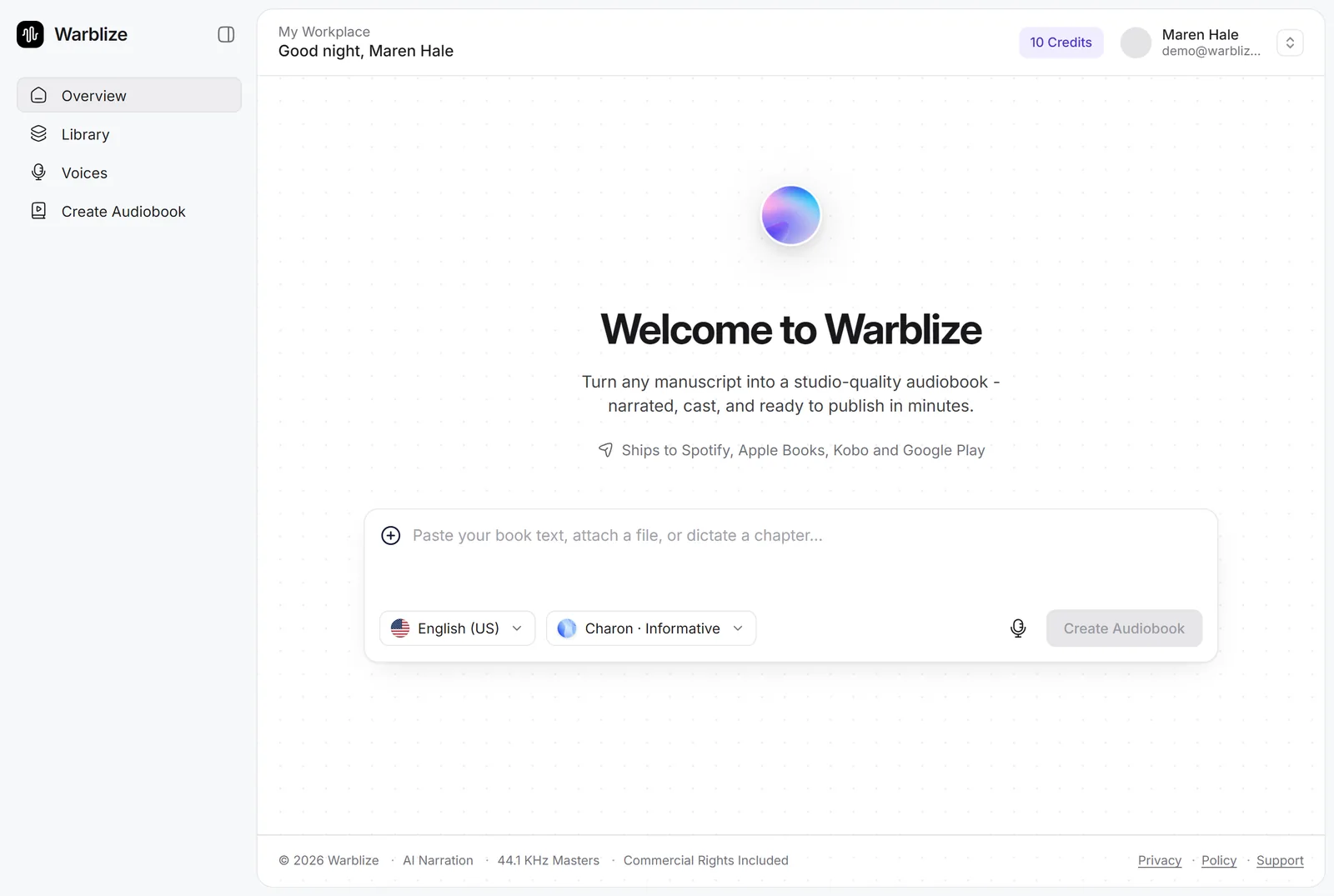
Drop your EPUB, PDF, DOCX or TXT file in the upload box (up to 100 MB) and press Continue.

Warblize finds the chapters and shows them in the Chapters step. This is where you clean up the structure:
- Untick any chapter that is only an author's note, hiatus notice or thank-you post. (AO3's Preface and Afterword are already gone.)
- Drag chapters to reorder them, for example if you combined several works of a series into one file.
- Add a cover: upload a square image (3200 × 3200 px recommended, up to 10 MB). Fan art is lovely here if the artist agrees.
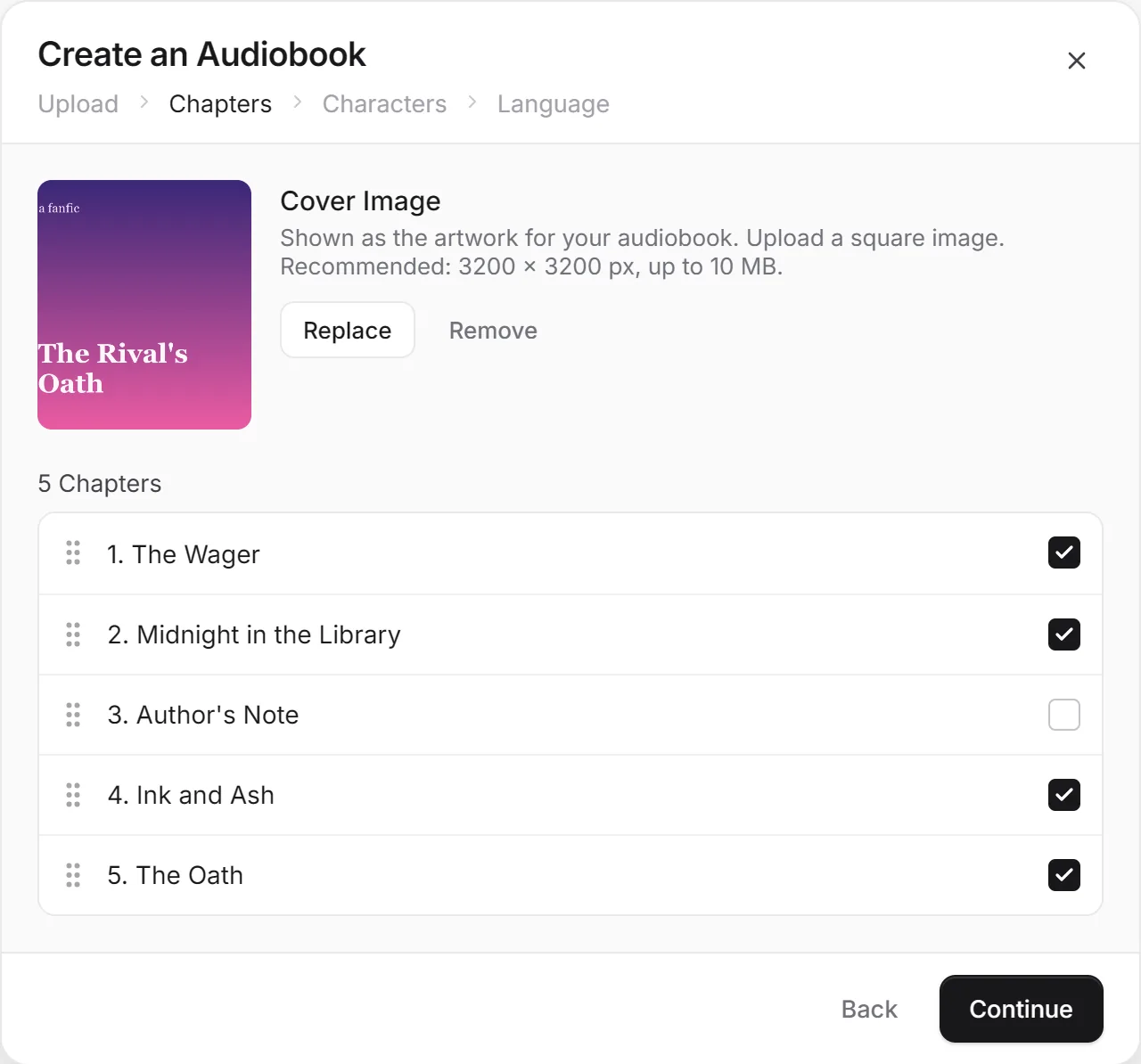
Press Continue through the Characters step (you'll cast everyone automatically in the next step) to Language. Warblize shows the language your fic is in; choose the language it should be narrated in and continue to the studio. Fics in Spanish, Portuguese, German, Japanese and 40+ other languages are narrated with a local accent, and if you pick a different language, the fic is translated as it's narrated.
Step 5: Press Find characters
A fic with one flat voice for everyone is hard to follow. In the studio, open Characters on the left and press Find characters. It reads the whole fic and:
- works out who says every line of dialogue, including lines with no dialogue tag;
- gives the dialogue to the character and leaves "she said" with the narrator;
- notices first-person narrators, so a fic told in Kit's voice is read by Kit;
- gives each main character a voice that fits their gender, age and personality, and gives minor speakers a few shared extra voices;
- shows a quote from each character so you can tell who is who.
It's free, takes a few minutes for a long fic, and never overwrites a line or voice you set by hand. How Find characters works explains it in detail.
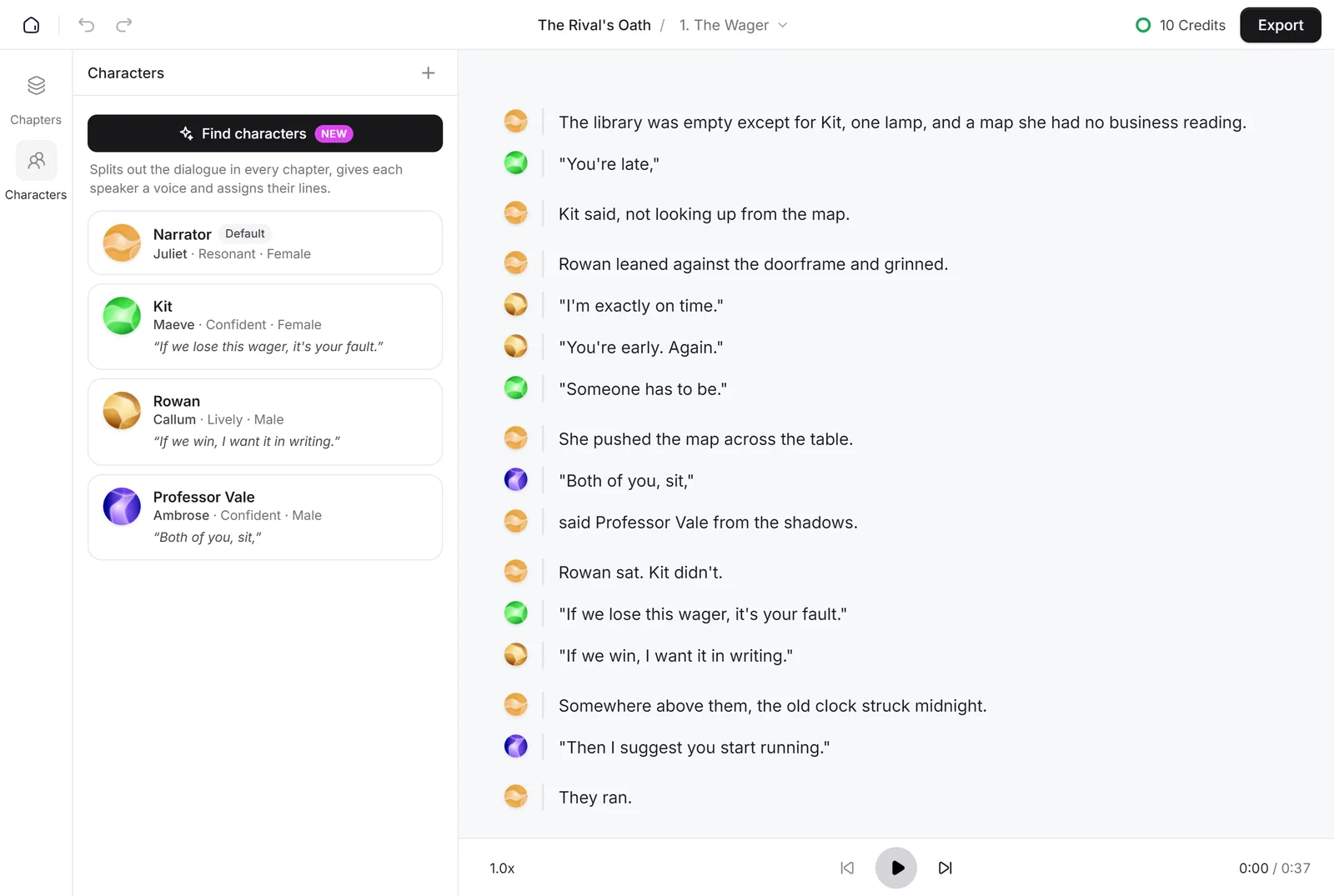
Fix a line the AI gave to the wrong character by clicking the voice dot beside it and choosing the right speaker. The rest of that conversation adjusts around your choice. This is also how you give each text message in a chat fic to the character who sent it.
Step 6: Pick and customize each character's voice
Find characters picks a sensible voice for everyone, but you know these characters better than anyone. To change one, open the ⋯ menu on the character and choose Change voice. Voices are grouped by genre (romance, fantasy, young adult, thriller and more), with a male and female filter, and you can hear every voice here first.
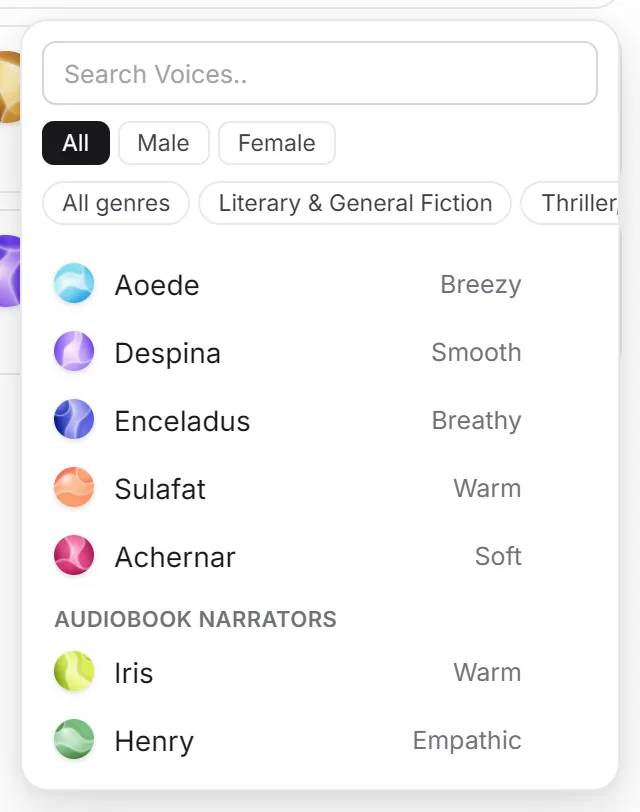
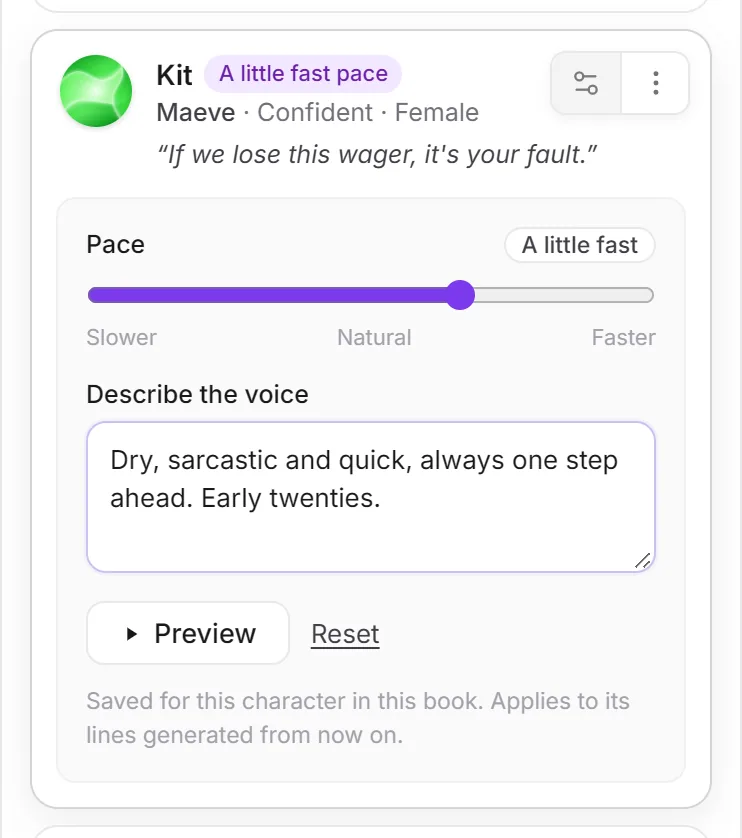
Then press the Customize button on the character. There are two settings:
- Pace, from slower to faster. A quick-witted character can speak a little fast; an old wizard can take their time.
- Describe the voice, in one plain sentence: who they are, how they sound and how they speak. For example "Dry, sarcastic and quick, always one step ahead. Early twenties."
Press Preview to hear the character say one of their own lines.
Tips for fandom characters
- Describe the character, not the actor. "A cool, clipped British boy, posh and guarded" works. "Sounds like the actor from the films" doesn't: the AI voices can't copy a real person's voice.
- Match the canon's accent with the narrator. For a fandom set in Britain, choose a British narrator, and the character voices will be matched to it.
- Mind ages across timelines. In a fic that jumps from first year to adulthood, describe the age in the voice ("eleven years old") or make a separate character for the older version.
- Customize before you generate. Settings apply to lines generated from then on, so set voices up first.
How to make an emotional AI audiobook has more examples of good voice descriptions.
Step 7: Add emotion to the big moments
Fic readers come for the feelings. Click a sentence, put the cursor where the emotion happens and type [. A picker opens with more than 30 tags: laughter, sadness, anger, fear, whispers, pauses and more. You can also type your own, such as [nervous laugh].
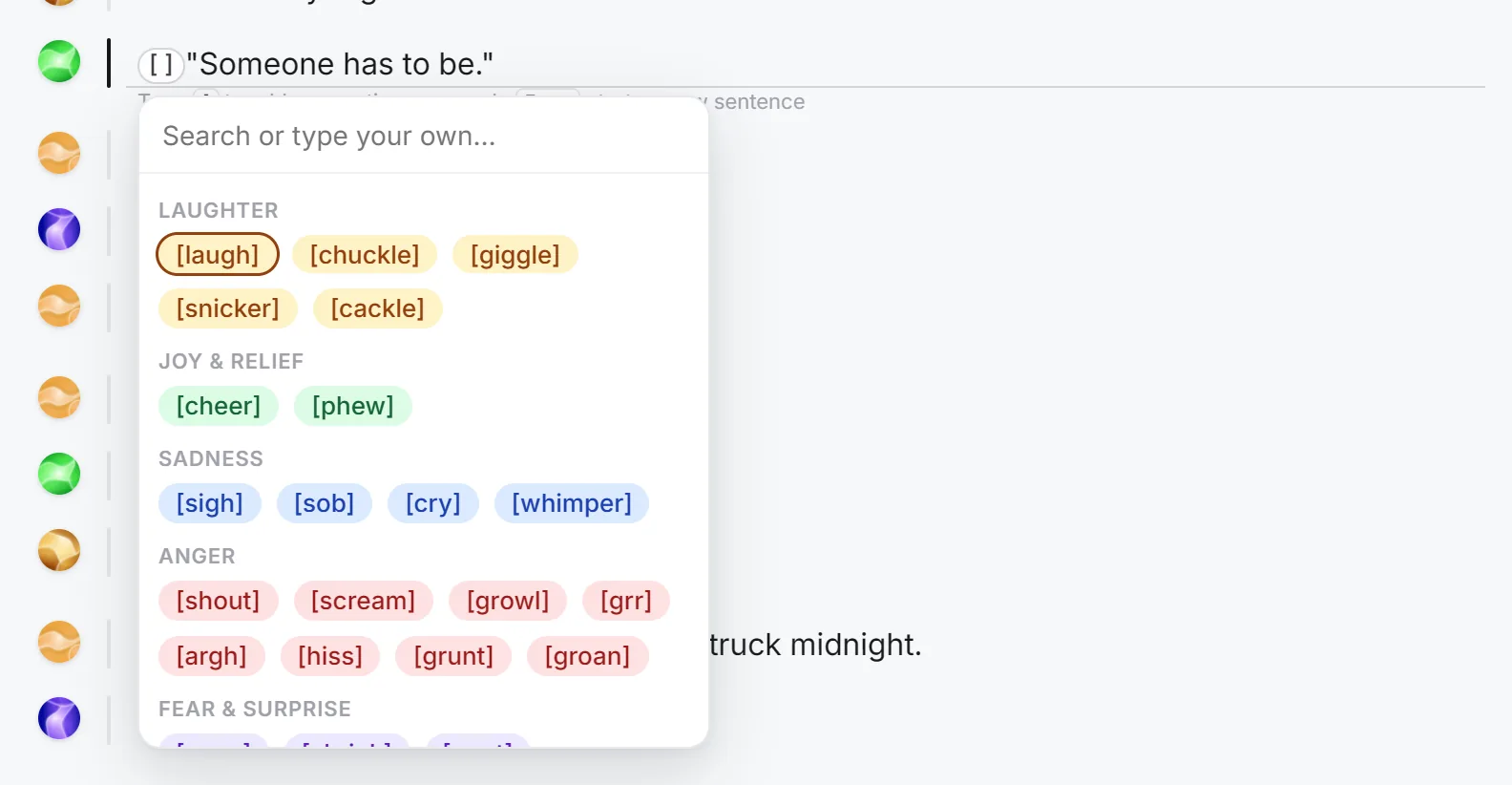
Use tags for the moments that matter, such as the confession, the argument or the first laugh, rather than on every line. Generate just that line to hear it, and adjust if it's too much.
Step 8: Listen and fix names
Press play and listen to each chapter. The most common problem in fanfic is made-up and foreign names: spells, places and characters from your canon.
- Respell a name the way it sounds in that sentence, for example "Her-my-oh-nee", "Sess-sho-maru" or "Dah-nair-iss", then regenerate only that line. The other lines don't change.
- Edit any sentence that reads oddly, such as a typo or a line of dialogue that runs into narration.
- Regenerate a line if you'd like a different take. Each line is generated on its own, so fixing one never means redoing a chapter.
Step 9: Export as M4B and listen anywhere
Press Export at the top of the studio. Choose Full project and set the format to M4B (audiobook). The menu shows what generating the rest of the fic will cost, broken down by character, before you start.
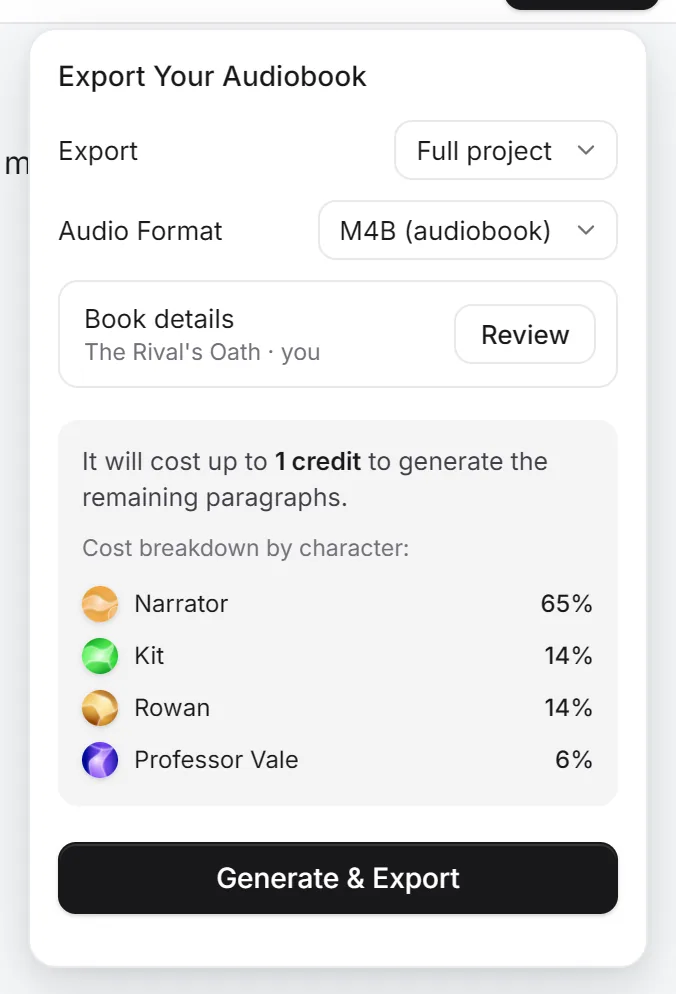
Press Review next to Book details to set the title, author (your AO3 name), narrator, series and cover. If your fic is part of a series, fill in the series name and number so audiobook apps keep the works in order. Then press Generate & Export.
You get one .m4b file with a chapter marker for each chapter, the cover and the details. Open it in Apple Books or BookPlayer on iPhone, Smart AudioBook Player or Voice on Android, or Audiobookshelf or Plex on your own server. Choose MP3 instead if you'd rather have one file per chapter. How to create an M4B audiobook covers the export options in detail.
How long and how much
At about 9,000 words per hour of audio, and one credit per hour:
| Fic | Words | Audio | Credits |
|---|---|---|---|
| Drabble collection | 1,000 | about 7 minutes | 1 |
| One-shot | 5,000 | about 35 minutes | 1 |
| Short multi-chapter | 20,000 | about 2.2 hours | about 3 |
| Longfic | 50,000 | about 5.5 hours | about 6 |
| Novel-length | 100,000 | about 11 hours | about 11 |
| Epic | 250,000 | about 28 hours | about 28 |
Plans start at $19 a month for 3 credits; see the pricing page or facts and pricing for all plans. Uploading, Find characters, voice previews, editing and exporting (and exporting again) cost nothing extra. To estimate a specific fic, paste its word count from AO3 into the audiobook length calculator.
Fanfic formats that need extra care
- Reader-insert (x Reader) fics: replace Y/N and the other placeholders before you upload. Second-person narration ("you walk into the room") reads naturally once the placeholders are gone.
- Chat fics and social media AUs: keep each message on its own line with the sender's name, then assign each line to its character in Step 5. Write out emoji you want heard.
- Epistolary fics (letters, diary entries): assign each letter to the character who wrote it, so the letter is read in their voice.
- First-person fics: Find characters notices a first-person narrator and gives the narration to that character. In a fic that switches POV between chapters, check each chapter's narration voice after casting and fix any chapter with the voice dots.
- Fics in other languages: choose the fic's language when you create the audiobook. Warblize narrates in 40+ languages, and can translate as it narrates if you want an English version of your own non-English fic.
- Series: make one audiobook per work, with the same voices, or combine the works into one file and use the series fields so apps keep them in order.
Common mistakes
- Narrating a fic without asking. Even a free, unshared audio version of someone else's fic should start with a message to the author.
- Leaving notes in a file from another site. Warblize cleans AO3 EPUBs, but a fic copied from FanFiction.net or Wattpad keeps every "A/N" and disclaimer you pasted in. Delete them before you upload.
- Generating before casting. Run Find characters and set up voices first, then generate, so the voices are right the first time.
- Tagging every line. Emotion tags work best where the scene turns. On every line they sound forced.
- Selling it. Don't. Keep fanfic audiobooks free, credited and labeled.
Ready? Create your fanfic audiobook, or first listen to the voices and pick your cast.
Common questions
Can I turn a fanfic into an audiobook?
Yes. Download the fic as an EPUB (AO3 has a Download button on every work) or save it as a DOCX or TXT file, upload it to an AI audiobook maker such as Warblize, cast a voice for each character and export it as an M4B or MP3. Use your own fic, or get the author's permission first.
Is it legal to make an audiobook of a fanfic?
Fanfiction uses characters and worlds owned by someone else, so an audio version is a derivative work too. Fandom generally treats non-commercial fan works as acceptable, and many rights holders tolerate them, but that is a convention, not a license. Keep the audiobook free, credit the original story and the canon it is based on, and never sell it. This is general information, not legal advice.
Can I make an audiobook of someone else's fanfic?
Only with the author's permission. Ask them directly, and say it will be AI-narrated: many fic writers are happy with human podfic but feel differently about AI. A podfic blanket permission statement on an author's profile was usually written with human readers in mind, so ask anyway.
Can I sell a fanfic audiobook?
No. The characters and world belong to the original creator, so selling an audio version of a fanfic, even one you wrote, risks a copyright claim. Warblize gives you commercial rights to the audio it generates, but that doesn't extend to someone else's characters. If you want to sell, file the serial numbers off: rewrite the story as an original work first.
What is podfic?
Podfic is the fandom name for an audio recording of a fanfic, traditionally read by a fan. An AI-narrated fanfic is sometimes called an AI podfic. If you share one, label it clearly as AI-narrated, because many podfic communities and events only accept human readers.
How do I download a fanfic from AO3?
Open the work, press Download at the top of the page and choose EPUB. AO3 also offers AZW3, MOBI, PDF and HTML. EPUB works best, because each chapter of the fic arrives as its own chapter, ready for the audiobook.
How do I download a fanfic from FanFiction.net or Wattpad?
Neither site has a download button. If it's your story, copy each chapter from the site's editor into a Word document, with the chapter title on its own line, and save it as DOCX. Some readers use tools such as FanFicFare to save fics as EPUB; check the site's terms before you do.
Will the AI read the author's notes?
Not AO3's own notes. When you upload an EPUB downloaded from AO3, Warblize removes the Preface (rating, tags, stats and summary), the Afterword, and every Chapter Summary, Chapter Notes and Chapter End Notes block, and keeps the chapter titles and the story. Notes typed into the story itself, such as an "A/N:" line in the middle of a chapter, are part of the story text, so delete those in the studio or before you upload, and untick any chapter that is only a note.
What do I do about Y/N in a reader-insert fic?
Replace Y/N with a name, or with you and your, before you upload, so the narrator doesn't say the letters out loud. Find and replace in Word does it for the whole fic in one go.
How long will my fic be as an audiobook?
About one hour per 9,000 words. A 5,000-word one-shot is about 35 minutes, a 50,000-word longfic about 5.5 hours, and a 150,000-word epic about 17 hours.
How much does it cost to make a fanfic audiobook?
On Warblize, one credit makes 60 minutes of finished audio, and plans start at $19 a month for 3 credits. A 50,000-word fic uses about 6 credits. Uploading, finding characters, editing, previewing voices and exporting cost nothing extra.
What app should I use to listen to a fanfic audiobook?
Export it as an M4B and open it in Apple Books or BookPlayer on iPhone, Smart AudioBook Player or Voice on Android, or Audiobookshelf and Plex on your own server. They show the chapters and remember where you stopped.
Want to hear your own book?Upload a manuscript to see its length and hear a narrated chapter before you pay for anything.
 Create your audiobook